China Metro: How to Actually Get Through the Gate
Stuck at the subway gate? Here is how riding the metro in China really works — walk straight through with Alipay, WeChat, a Visa card or Apple Pay, or buy a ticket at the machine, then enter, ride and exit.
The one thing that trips everyone up
Most first-time visitors to China get stuck at a single moment: standing in front of the subway gate, not sure whether to tap, scan, or buy something first. Everything else about the metro — the trains, the signs, the platforms — is easy once you are on the other side.
So this guide is not about payment theory. It is about the actual flow: how you get from the station entrance to the platform, and what to do at that gate.
There are two ways through the gate, and the fastest one needs no ticket machine at all. The picture below is the whole thing on one page — one glance and you see the entire metro process, from the station entrance to tapping out at your stop:
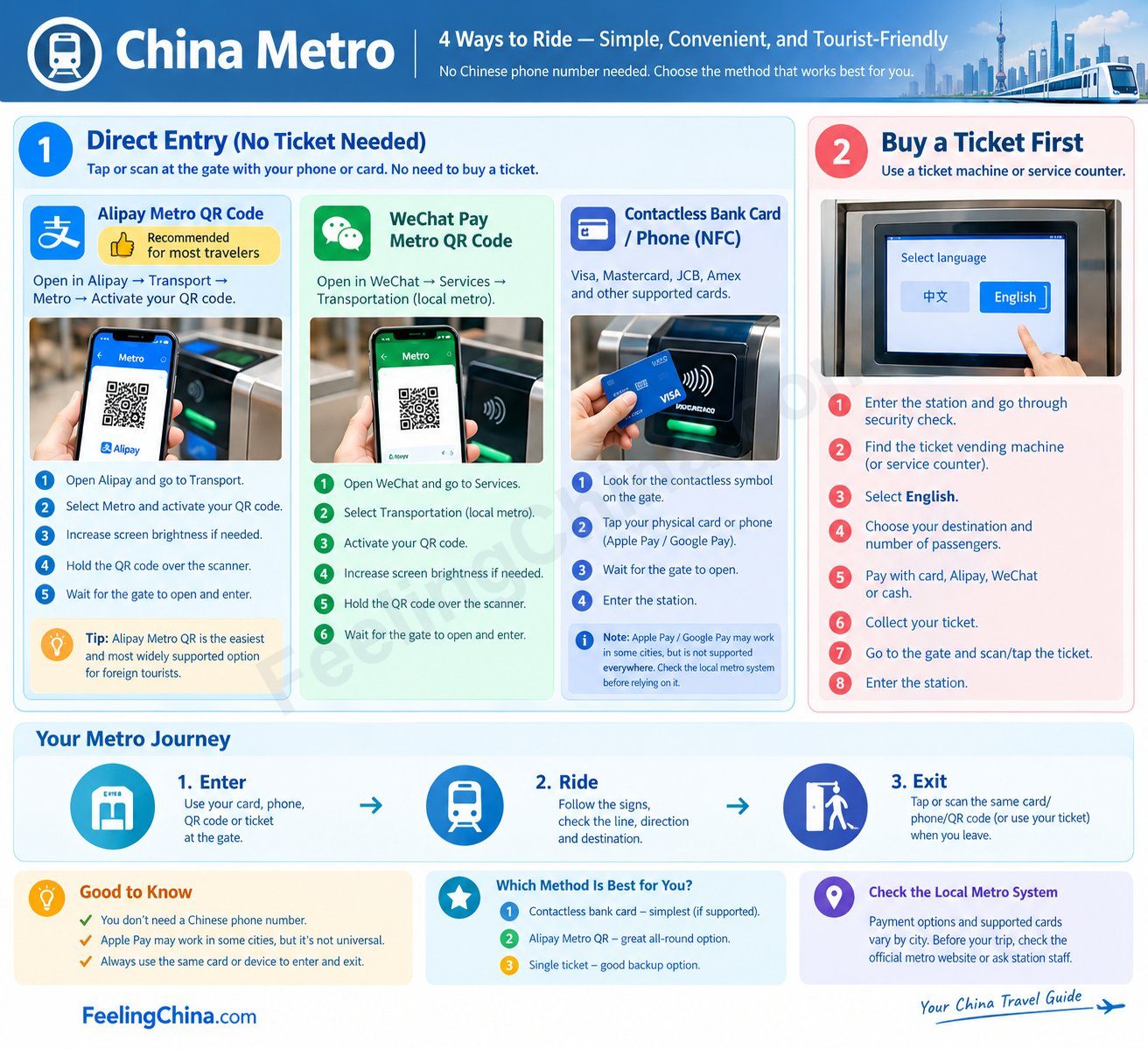
China metro in one picture — the full process, at a glance.
We cover direct entry first — it is what most visitors should use — then the ticket machine as the universal fallback.
Path 1 — Direct entry (no ticket buying)
This is the easiest way: you already have a credential on your phone or in your wallet, so you skip the machine and go straight to the gate. Direct entry splits into two families — a QR code (Alipay / WeChat) or a tap (Visa card, Apple Pay, transit card).
Option A — QR code (Alipay or WeChat)
The QR is generated inside an app, not bought at a machine.
- Alipay (支付宝) — “出行” (Travel). Open Alipay, tap 出行 (or search “出行”), pick the city, and a metro QR appears. Alipay is usually the easiest for foreign tourists because it binds international cards smoothly.
- WeChat (微信) — “出行” or the city’s metro mini-program. Open WeChat, tap 出行, or search the city’s official metro mini-program (e.g. 北京地铁, Metro 大都会 for Shanghai). A QR appears.
Points to watch with QR:
- Use the same QR to enter and exit. The system pairs your entry scan with your exit scan — if you enter on Alipay, you must exit on Alipay. Switching apps mid-trip leaves the gate confused and can overcharge you.
- You are charged when you exit, not when you enter. The fare is calculated from entry to exit and billed to your Alipay/WeChat after you scan out.
- The QR is city-specific. Switch the city in the app when you move to a new one; the QR from Beijing will not open a Shanghai gate.
- Keep the phone ready and charged. You need the app open (or at least the cached QR) at both gates. A dead battery means falling back to a ticket machine.
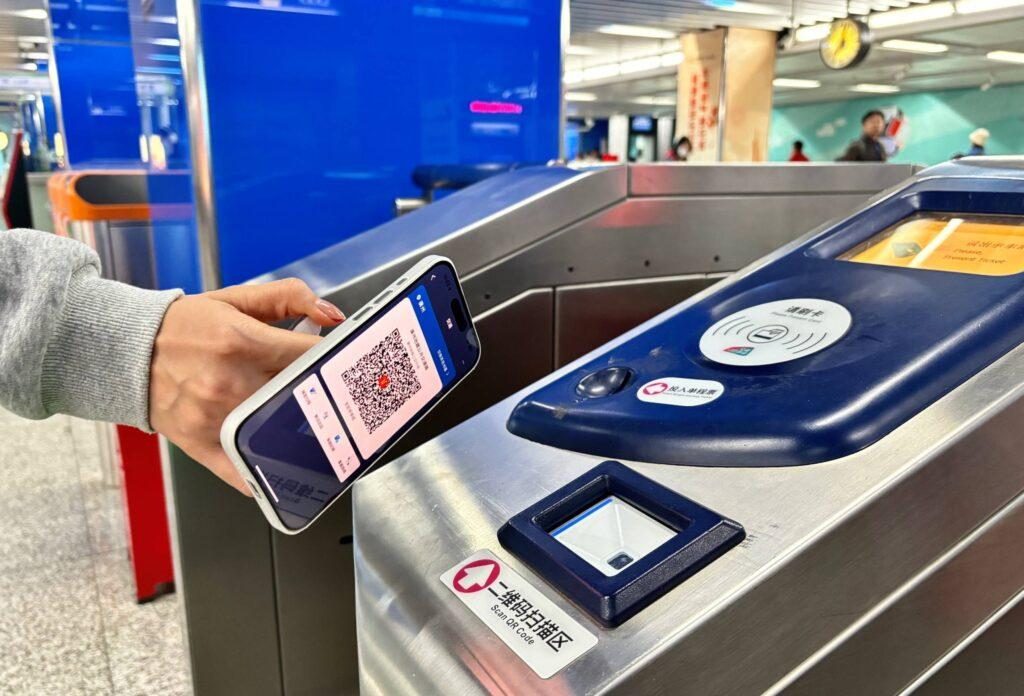
Option B — Tap a card or phone (Visa, Apple Pay, transit card)
Instead of a QR, you tap a physical card or your phone at the reader.
- Visa / Mastercard / foreign bank card (contactless). In major cities — Beijing and Shanghai among them — metro gates accept foreign contactless cards directly. Just tap the physical card on the reader; no app, no Chinese number needed.
- Apple Pay. Add a China transit card (e.g. 京津冀互联互通卡, 上海交通卡) or a credit card to Apple Wallet, enable Express Transit, then tap your iPhone or Apple Watch at the gate — no Face ID needed each time.
- Transit card (交通卡, e.g. Beijing Yikatong). A stored-value card you tap in and out; balance is deducted per trip.
Points to watch with tap:
- Use the same card / device to enter and exit. Tap the same Visa card out that you tapped in; use the same iPhone for both. Mixing leaves the gate open.
- You are charged when you exit, exactly like QR — the trip fare is taken (from your card, Wallet balance, or transit-card balance) after you tap out.
- Not every city takes every scheme. Look for the contactless (︎) symbol; if a Visa tap does not open the gate in a smaller city, switch to Alipay/WeChat QR or a ticket. Foreign-card tap is expanding fast but is not universal yet.
- The card must be contactless. A swipe-only magnetic-stripe card will not work; tap-to-pay is required.
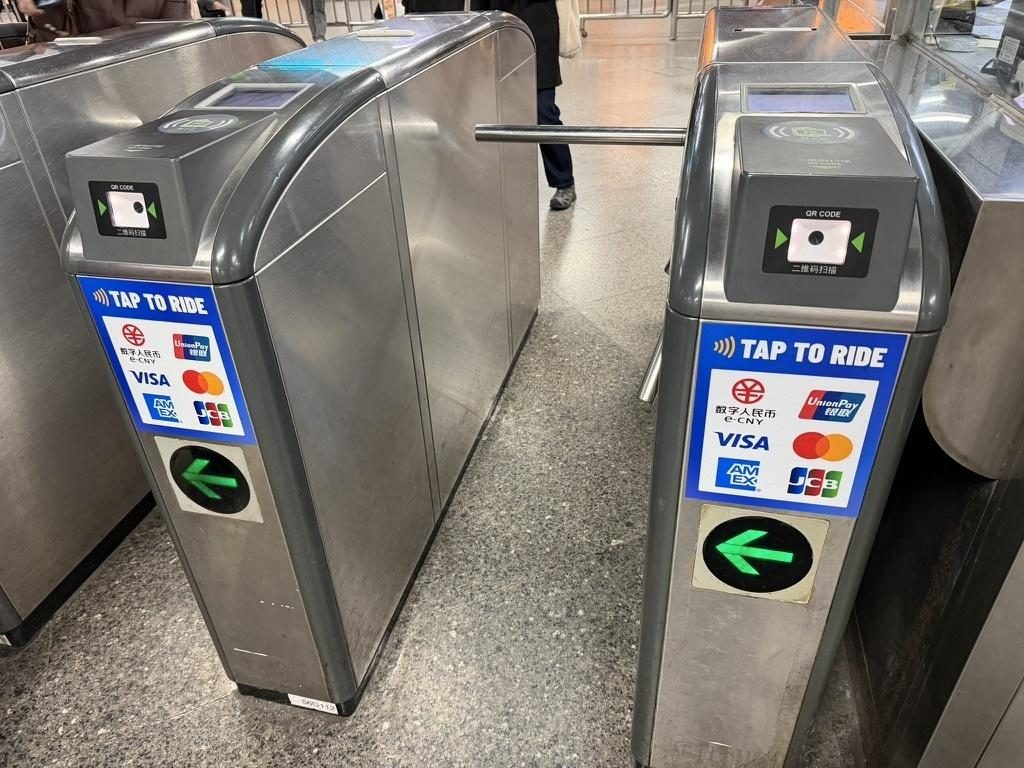
At the gate with direct entry
The actual moment at the gate:
- Every gate takes every method — there is no separate “QR lane” or “card lane”. On a modern gate the QR scanner window, the card reader and the ticket slot sit at different spots on the same barrier. Hold your QR under the scanner window (marked 二维码扫描区), tap a card or phone on the reader, or drop a ticket in the slot. If you are unsure which spot is which, glance at the person just ahead of you.
- One person, one tap/scan. Stand behind the line, let the gate close behind you, and don’t tailgate.
- Watch the light and the direction sign. Green = go; red X = this lane is closed to you. Gates are one-way and sit side by side, so the “wrong” one simply will not open — look up at the overhead sign, step to the next lane, or ask at the staff window (站务员 / 客服中心). Staff expect confused tourists and sort it out in seconds.
You never “pay at the gate.” With direct entry the fare is handled automatically on exit.
Path 2 — Buy a ticket, then enter (the fallback)
Use this if your phone is dead, an app will not load, or a foreign card will not tap. Every station has ticket machines (自助售票机) near the entrance, and they always work.
At the ticket machine — step by step
- Choose the language. Machines offer a language button (中文 / English / 한국어 / 日本語 …). Tap English first.
- Choose your destination. Tap your destination station on the map, or pick the line then the station. The machine shows the fare before you pay.
- Choose the number of passengers. Use the + / − buttons to set how many single tickets you need — one ticket per person. The total updates automatically.
- Pay. The machine shows a payment screen. You can pay with:
- Cash (RMB) — notes and coins; the machine gives change.
- Scan a QR — any Chinese payment app. The machine displays a single merchant QR code, exactly like the one you scan at a shop. Scan it with Alipay, WeChat Pay, UnionPay Cloud QuickPass (云闪付) or any Chinese banking app, then confirm on your phone. It is not a metro-only code, so whichever app you already have set up will work.
- Bank card — most machines take UnionPay (Chinese bank cards). Many do not accept foreign Visa/Mastercard, so if your foreign card is refused, use cash or scan the QR instead.
- Collect your ticket. The machine prints a single-journey ticket — a thin card, or a coin-like token on older lines.
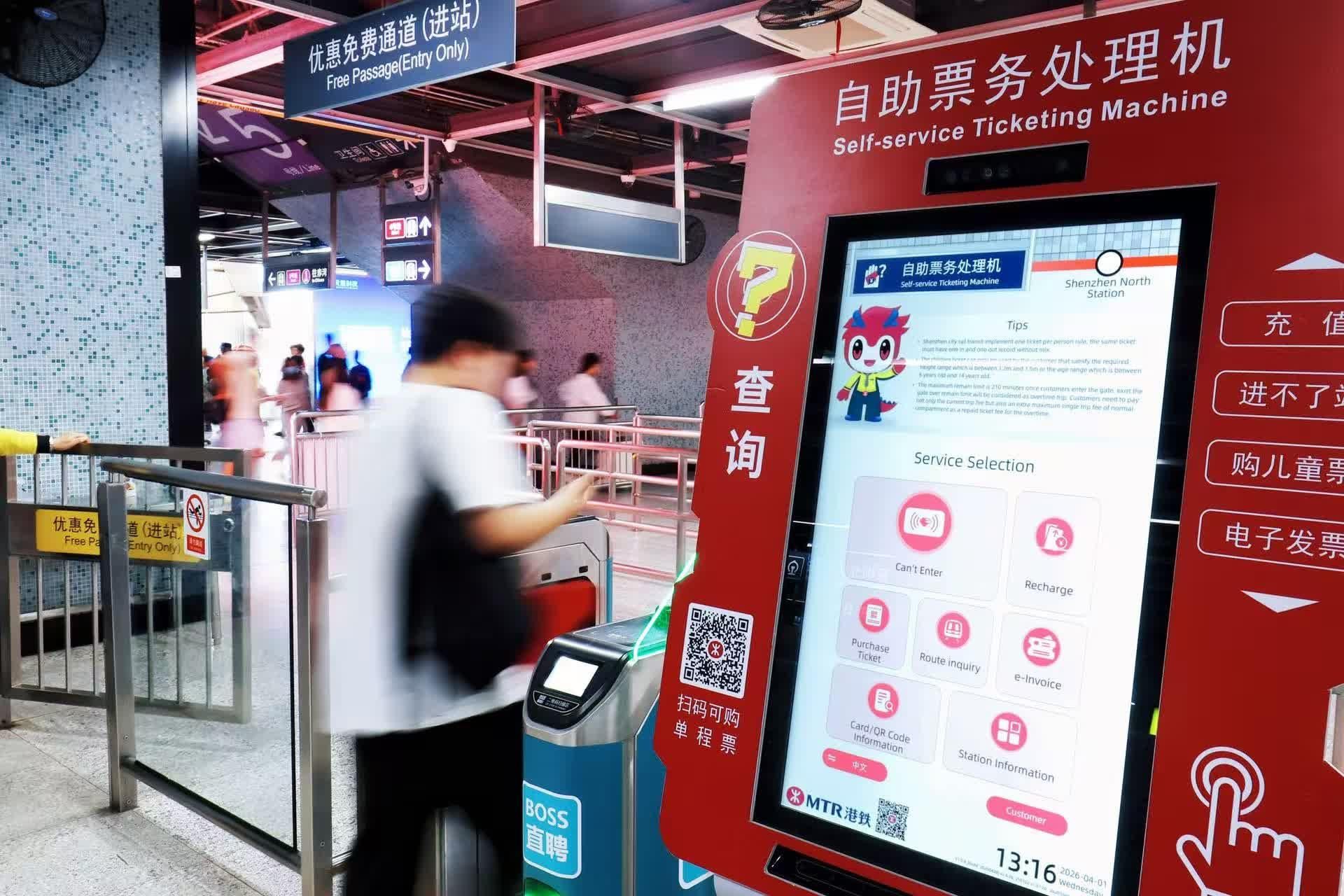
At the gate with a ticket
- You pay upfront, at the machine — the fare is already settled.
- Hold the card to the scanner, or drop the token into the slot; the gate opens. Keep the ticket — you need it to leave.
- On the way out, scan or insert it again; the token is swallowed (or the card returned) and you walk through. No extra charge.
Enter → Ride → Exit
Enter — clear security first
One thing that surprises nearly every first-timer: every Chinese metro station has a security check, and it comes before the ticket gates, right at the station entrance. It is airport-style but quick:
- Put every bag — backpack, handbag, shopping bag, suitcase — on the X-ray belt, and walk through (or past) the metal-detector archway. The whole thing usually takes under 30 seconds.
- You do not remove shoes, belts or laptops, and sealed water bottles are normally waved through. This is not airport security.
- If the screen shows something unclear, staff may ask to open your bag or re-scan a bottle. It is routine — just comply.
- There is a luggage size limit (roughly 130–150 cm as length + width + height, varying by city); over-sized cases can be refused, especially at rush hour.
Only after security do you reach the ticket gates. Then follow the overhead signs to your line (线) and platform (站台).
Ride — watch the line colours
Here is the detail that saves visitors the most confusion: one station often serves several lines, and each line has its own colour. Beijing Line 1 is red, Line 2 is blue; Shanghai Line 1 is red, Line 2 is green, Line 3 is yellow. Signs are colour-coded.
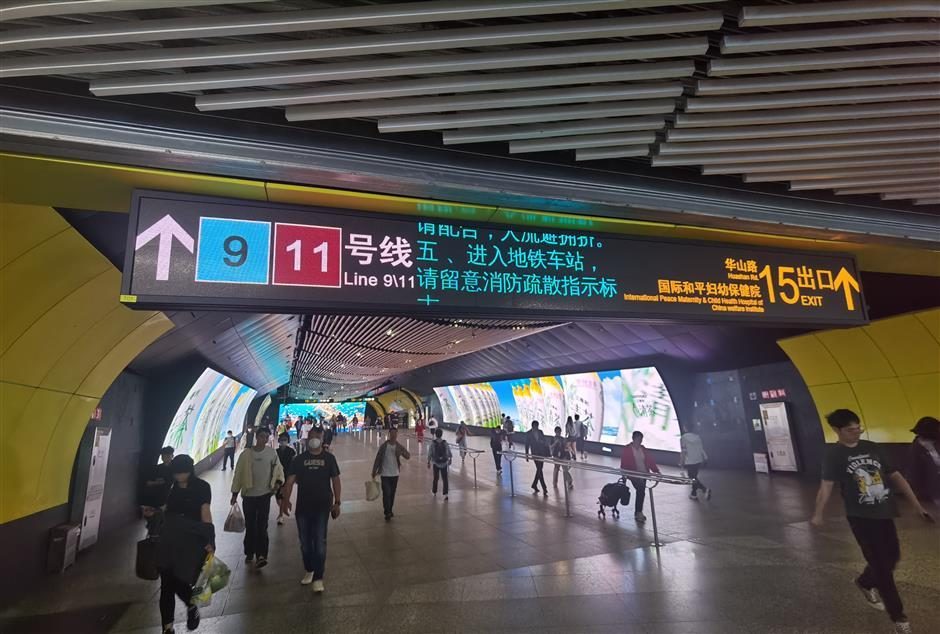
- Look up at the signs. Every wall, pillar and ceiling has directional signs in both Chinese and English, colour-matched to the line.
- Follow the colour, not just the name. Match the coloured line on the sign to the line you want, then follow it — the arrows lead you to the right platform, and you will not end up on the wrong line.
- Trains show their destination and line colour on the front and inside; confirm before boarding.
- On the platform, wait behind the yellow line; doors open automatically and announcements play in both Chinese and English on most lines.
Exit
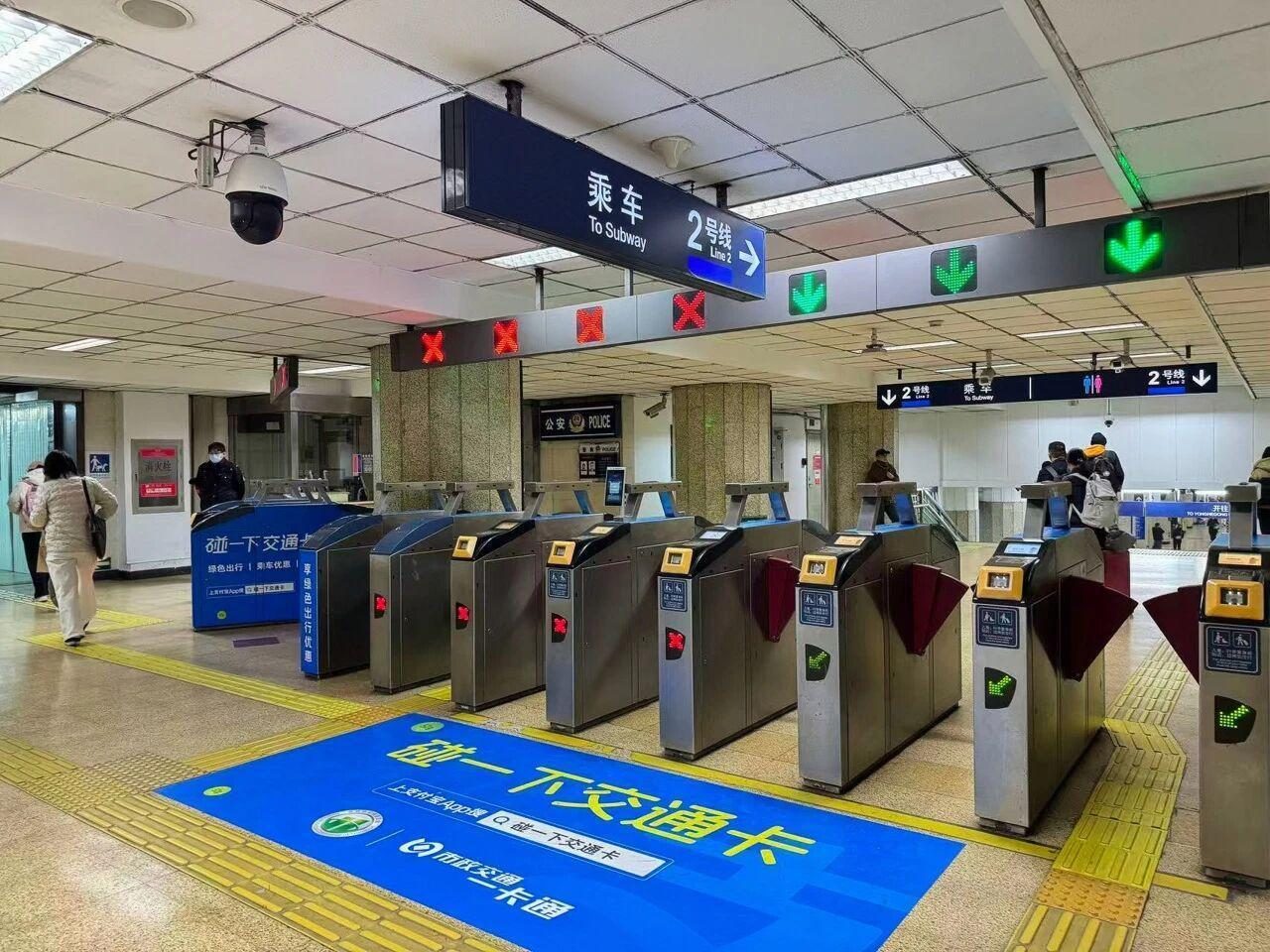
- Gates are one-way. Entry and exit lanes are separate and often sit right next to each other, each locked to one direction and marked overhead. Follow the green arrow — that lane is open for your direction; a red X means it is closed to you, so step along to the next one.
- Scan or tap again to leave. With direct entry this is when the fare is charged; with a ticket the token is collected.
- Transfers are free inside the paid area — change lines by following the transfer signs; you only scan/tap out once, at your final stop.
- Pick the right exit. Exits are lettered A / B / C / D … and open to different streets. Check which one is closest to where you are going (use Amap or Baidu Maps) before you leave the platform.
Which way should you use?
For most visitors: set up the Alipay or WeChat metro ride code (the 出行 / 乘车码 transit code) before you arrive — or on hotel Wi-Fi on day one. This is not an ordinary payment QR: it is the transit code inside the app’s 出行 (Travel) service, generated specifically for the metro. One setup covers most major cities, there is nothing to buy at the machine, and you just hold your phone under the gate scanner. Keep Apple Pay or a Visa tap as a fast backup, and the ticket machine as the universal fallback.
City apps & QR notes
- Beijing — Alipay/WeChat “出行”, or 北京地铁; Yikatong card at stations.
- Shanghai — Metro 大都会 app, or Alipay/WeChat “出行”.
- Guangzhou — 穗畅行 app, or Alipay/WeChat “出行”.
- Shenzhen — 深圳地铁 app, or Alipay/WeChat “出行”.
- Increasingly, Alipay and WeChat “出行” work across cities with one setup — open the service, switch the city, and the local metro QR appears.
For finding the right exit, platform and walking route, Amap (高德地图) or Baidu Maps are far better than Google Maps in China — see the Maps in China guide. Need the apps first? See the China Travel Apps guide. Paying by phone? See Alipay for foreign tourists.
Practical tips
- Avoid rush hour (roughly 7:30–9:30 and 17:30–19:30) if you can — trains are packed and gates are busy.
- Luggage goes through the wider accessible gate (look for the extra-wide lane); don’t force big bags through a standard turnstile.
- Stand on the right on escalators; walk on the left.
- Have your QR / card ready before you reach the gate — fumbling with your phone in the queue is the classic hold-up.
- Screenshot the station name in Chinese (and your destination) before you set off; it helps at ticket machines and with staff.
Common mistakes to avoid
- Trying to “pay” at the gate. You don’t — payment happens at the machine, or is charged on exit.
- Mixing entry and exit methods. Entered on Alipay? Exit on Alipay. Tapped a Visa in? Tap the same Visa out.
- Walking into a one-way gate the wrong way. Entry and exit lanes are direction-locked and sit side by side. Check the overhead sign: green means the lane is open for you, red X means it is not. A gate that “won’t open” is usually just the wrong direction — look up before you push.
- Forgetting to scan/tap out. The gate won’t open next time, and you may be charged the maximum fare.
- Ignoring line colours. Same station, different lines, different colours — match the sign’s colour to your line or you may board the wrong train.
- Tailgating. The gate senses two bodies and stops; wait for it to close.
- Losing the token. A single-journey ticket is needed to exit — keep it safe.
The metro is one of the cheapest, fastest and most tourist-friendly ways to move around Chinese cities. Once you have walked through that gate once, the rest is just signs and trains.
Was this guide helpful?
Frequently asked questions
Can foreigners use the metro in China?
Can I use my Visa or other foreign card directly at the gate?
Do I pay when I enter or when I leave?
Do I have to use the same app or card to enter and exit?
Which QR code do I scan at the metro gate?
Is Apple Pay accepted on the metro?
Last updated: 2026-10